
This post contains affiliate links. I earn a commission if you purchase through them, at no extra cost to you.
If you’ve been following The Blog Fixer for a while, you know I’ve generally preached minimalism and skepticism toward “magic speed fixes.” I’ve told many of you that your Google PageSpeed score does not matter.
Then I tested a plugin called FastPixel that boosted my wife’s mobile scores from the 50s into the 90s. I was ready to write a glowing review and tell everyone to install it immediately.
Then I dug deeper. And what I found is more useful than any plugin recommendation.
The test that changed my mind (and then changed it back)
Katie’s site, Kitchen Stewardship, is full of recipe posts loaded with images. Her mobile PageSpeed scores had been sitting in the orange and red for months. I’d basically given up trying to fix them manually. That’s right, she has a software developer husband who owns a blog fixing site, and she wasn’t getting good scores. Oh the humanity!

So when the team at FastPixel asked if I’d test their caching plugin, I figured why not. I installed it, ran dozens of before-and-after tests, and the results were dramatic. Pages that were taking 7 to 13 seconds to load on mobile? Down to under 2 seconds. Mobile scores jumped 34 to 44 points. Katie’s recipe posts went from “Poor” well into the 80s and 90s.
I was sold. I started writing this review.
Then I learned something that stopped me in my tracks.
The number Google actually cares about (it’s not your PageSpeed score)
Here’s what most bloggers don’t know, and what I’m embarrassed to admit I’d glossed over myself: Google does not use your PageSpeed Insights score for rankings.
When you run a test on PageSpeed Insights, it runs a simulation. It creates a fake phone with a throttled connection and loads your page in a virtual environment. That’s your “lab score.” It’s useful for identifying specific problems, but it’s not what Google uses to rank your site.
What Google actually uses is called CrUX (Chrome User Experience Report). This is data collected from real Chrome users who visit your site. Real phones, real connections, real load times. Google gathers this data and uses it to determine whether your site passes or fails Core Web Vitals.
Your CrUX data is public. You can see it right in PageSpeed Insights, in the “field data” section at the top of your results (if enough people visit your site for Google to have data). It looks like this:
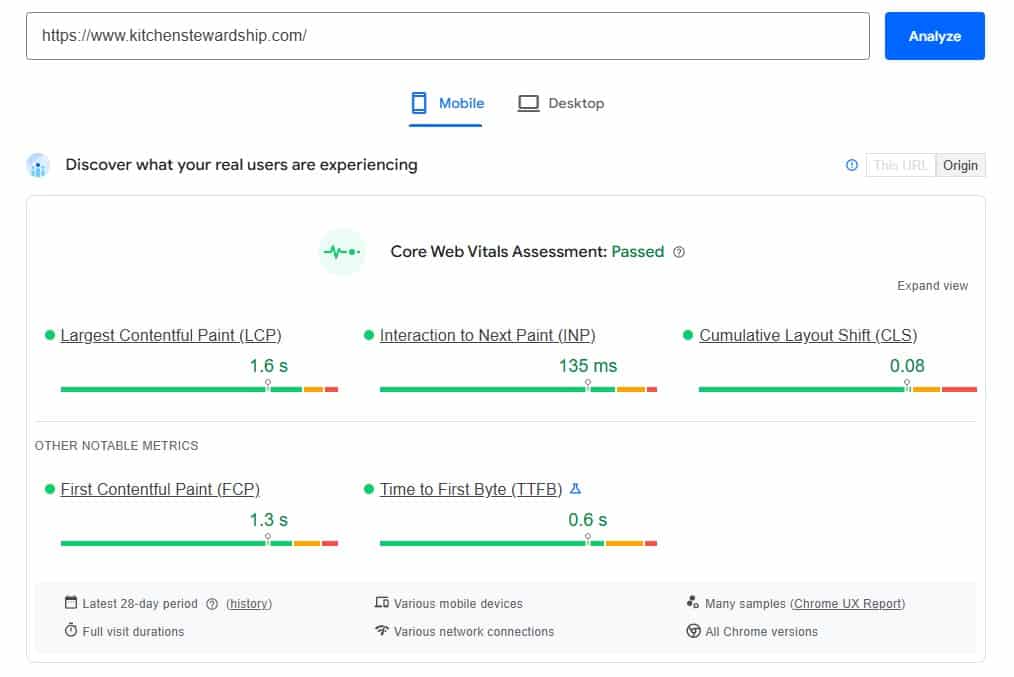
That “field data” section is what matters for rankings. The big score number below it? That’s the lab simulation. It’s useful for diagnostics, but it doesn’t directly affect where you show up in Google.
What I found when I checked the real numbers
After weeks of celebrating those 80s and 90s, I finally checked Kitchen Stewardship’s CrUX data.
Every single metric was already rated “Good.” Before FastPixel.
Real users loading Katie’s site on their phones were already getting fast load times. The 75th percentile LCP (how long until the main content appears) was 1.6 seconds. Google’s threshold for “Good” is 2.5 seconds. Katie’s site was passing with room to spare, and had been the whole time.
FastPixel took the lab score from the 50s to the 90s. That looked amazing. But the real-world data that Google uses for rankings? It said “fast” before I ever installed anything.
So what was going on?
Why the lab score and real-world speed can be so different
Kitchen Stewardship is hosted on BigScoots, which includes enterprise-level Cloudflare caching as part of their performance setup. Every page is cached at Cloudflare’s edge servers around the world. When a real person in Ohio loads Katie’s recipe post, they’re getting it from a Cloudflare server nearby, not from the origin server.
The PageSpeed lab test doesn’t benefit from this the same way real users do. The lab simulation runs in a controlled environment with artificial throttling. It penalizes things like third-party ad scripts, unoptimized CSS delivery, and JavaScript execution time. These are real issues, but they affect a simulated slow phone much more than they affect your actual readers on their actual devices.
FastPixel’s optimizations (inlining critical CSS, deferring JavaScript, serving images through their CDN) made the lab simulation much happier. But real users were already getting fast pages thanks to BigScoots’ caching infrastructure.
The lab score improvements weren’t translating into real-world gains because the real world was already fast.
And here’s the catch: you can’t just run both and get the best of both worlds. FastPixel and BigScoots’ enterprise caching fight each other. Pages fail to cache, CSS gets stripped, layouts break. To get FastPixel working properly, I had to ask BigScoots to turn off their caching entirely. When I did that back in November, the lab scores looked great, but BigScoots support later told me the CrUX data (the real-world numbers) actually got worse during that period. I was watching the wrong scoreboard while the one that mattered was going the wrong direction.
So does your PageSpeed score matter or not?
Here’s where I’ve landed after all this testing.
Your PageSpeed lab score is a diagnostic tool, not a report card. Use it to find specific problems (giant uncompressed images, render-blocking scripts, layout shift issues). Don’t chase the number itself.
Your CrUX field data is what actually matters for rankings. If your field data shows “Good” across Core Web Vitals, you’re fine. Google is happy. Your readers are happy. A lab score of 55 doesn’t change that.
If your CrUX data shows problems, that’s when to act. If real users are experiencing slow loads or layout shift, those are genuine issues affecting both your rankings and your readers’ experience. That’s when a tool like FastPixel, or better hosting, or script cleanup will actually make a difference.
When FastPixel actually makes sense
I want to be fair to FastPixel because the plugin does real work. It converts images to WebP, serves them through a CDN, inlines critical CSS, defers render-blocking JavaScript, and handles lazy loading. These are legitimate optimizations.
You’ll likely see real-world benefits if:
- Your hosting doesn’t include enterprise caching. If you’re on shared hosting or a managed host without Cloudflare Enterprise or a similar edge caching setup, FastPixel’s CDN and optimization pipeline could genuinely speed things up for real users, not just lab tests.
- Your CrUX data shows “Needs Improvement” or “Poor.” If real users are experiencing slow loads, FastPixel addresses the most common causes.
- You have a lot of images and no optimization in place. The automatic WebP conversion and CDN delivery is the easiest way to handle image-heavy sites without touching each image manually.
You probably don’t need it if:
- Your CrUX data already shows “Good.” Check your field data first. If real-world performance is already fast, you’d be paying to improve a lab score that doesn’t affect your rankings.
- Your host already provides enterprise-level caching. BigScoots, Rocket.net, and some other managed hosts include performance features that overlap with what FastPixel does. Running both can actually cause conflicts.
What FastPixel won’t fix (no matter what)
Even on sites where FastPixel helps, it can’t touch everything.
- Ad script bloat. If you run Raptive, Mediavine, or any major ad network, their scripts inject JavaScript that FastPixel can’t optimize. On Katie’s site, Raptive loads 54KB of non-deferrable JavaScript before any content renders. That’s a structural cost of running ads, and no caching plugin can fix it.
- Plugin bloat. If LearnDash is loading course CSS on your recipe posts, or you have two versions of the same plugin active, FastPixel will cache those problems faster but they’re still problems.
- Hosting-level conflicts. If your host has its own caching layer (like BigScoots Boost), you may need to disable one or the other. This isn’t always straightforward and can require back-and-forth with support teams.
- Google Discover eligibility. To qualify for Google Discover, your images need to be at least 1200 pixels wide. Google crawls your raw HTML, not the CDN-optimized version that FastPixel serves to browsers. So if your posts point to a 300-pixel cropped image in the actual content, that’s what Google sees, regardless of what FastPixel delivers to your readers. Fixing that requires changing the actual image references in your posts, not just optimizing how they’re delivered.

How to check your own site right now
Before you install anything or spend any money, do this:
- Go to pagespeed.web.dev
- Enter your homepage URL and run the test
- Look at the top section labeled “Discover what your real users are experiencing” or “Field Data.” If it says “This URL has sufficient real-world speed data,” you’ll see your actual CrUX metrics.
- If all metrics show green (“Good”), your real-world speed is fine. The big score number below doesn’t matter as much as you think.
- If any metrics show orange or red, those are genuine problems worth fixing. That’s where FastPixel or similar tools earn their money.
If your site doesn’t have enough traffic for CrUX data, you’ll see a message saying so. In that case, the lab score is all you have to go on, and improving it with a tool like FastPixel is a reasonable bet.
Where I ended up
I removed FastPixel from Kitchen Stewardship.
Not because it’s a bad plugin. It does real optimization work. But on a site with BigScoots’ enterprise Cloudflare setup, FastPixel created more problems than it solved. The two caching systems conflicted with each other constantly, requiring back-and-forth with both support teams. At one point FastPixel’s optimizer couldn’t even access our pages because Cloudflare’s security was blocking it. And when it did cache pages, it occasionally stripped critical CSS that broke the homepage layout.
Meanwhile, the number that actually matters for Google rankings (the CrUX field data) showed “Good” across every metric the entire time, regardless of whether FastPixel was on or off. Real users were getting pages in 1.3 to 1.6 seconds on mobile. Google was happy. Our readers were happy. The only thing that changed was the lab score, and as we’ve covered, that’s a simulation.
The lab score without FastPixel? 42 on the homepage. Ugly. But the real-world performance? Every CrUX metric rated FAST. Those two things can be true at the same time, and now you know which one Google cares about.
FastPixel is still running on The Blog Fixer, though, and I’m keeping it there. The Blog Fixer is on a standard BigScoots plan without the enterprise Cloudflare caching that Kitchen Stewardship has. There’s no page caching layer underneath, and the site doesn’t get enough traffic for Google to have CrUX data at all. The lab score is the only signal I have, and without FastPixel it sits in the 40s with a 6.7-second LCP. With FastPixel, it jumps to the 70s and 80s. On a site like that, where there’s no enterprise caching doing the heavy lifting and no CrUX safety net, FastPixel is doing all the work, and it shows.
That’s the real takeaway. Whether FastPixel is worth it depends entirely on what’s already running underneath. If your host provides enterprise-level caching and your CrUX data says “Good,” you probably don’t need it. If you’re on standard hosting without those layers, FastPixel can be the difference between a fast site and a slow one. Check your data first. I spent a full day learning that the hard way.
And if you suspect your images have deeper problems beyond delivery speed (missing alt text, broken Amazon product images, files hosted on external servers), a Blog Fixer Site Scan can identify exactly what needs attention. It’s $50, and that gets credited toward whatever fix you need.
Questions? Hit me in the comments. This one got complicated, and I’m happy to talk through what I found.
Leave a Reply
You must be logged in to post a comment.